

Description
Stylish Night Mode Browser Theme
Overview
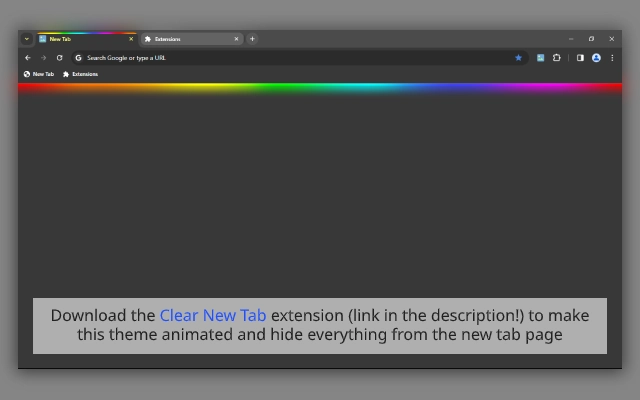
The "When the Night Falls" series introduces a visually immersive browser theme designed for users seeking a serene, dark-themed browsing experience. Tailored for individuals who spend extended hours online, especially during evening or nighttime sessions, this theme aims to reduce eye strain and enhance visual comfort. It features a dynamic rain background, creating a calming atmosphere ideal for focus and relaxation. The theme is part of a broader collection that includes variations like Neon Tabs and Standard, offering users a choice in aesthetic preferences. Targeted at consumers and casual users, it serves as a simple yet effective way to personalize the browser interface. The developer, BrowserVery, appears to focus on creating visually engaging and functional browser enhancements. Real-world usage scenarios include late-night reading, creative work, or simply enjoying a more aesthetically pleasing digital environment. While no additional details about the developer’s background were provided, the theme is accessible across multiple platforms, making it widely available to users across different operating systems.
Key Features & Capabilities
- Dark, Rain-Enhanced Background – Features a soft, animated rain effect over a dark canvas, promoting a tranquil browsing environment ideal for nighttime use.
- Multiple Theme Variants – Offers different versions within the series, including Standard, Neon Tabs, and a rain-themed variant, allowing users to choose based on personal style.
- Easy Installation – Designed for quick setup with minimal user input, enabling users to apply the theme in seconds.
- Cross-Platform Availability – Compatible with Windows, Mac, and Linux, ensuring broad accessibility across major operating systems.
- Customization Flexibility – Allows users to tailor their browser appearance with distinct visual elements, enhancing personalization without altering core functionality.
These features support users in creating a more immersive and comfortable browsing experience. For example, the rain background can help reduce visual fatigue during long sessions, while the variety of themes lets users experiment with different aesthetics. The theme is particularly useful for those who prefer a minimalist, dark interface with subtle animations. Installation is straightforward, making it accessible even to non-technical users. The ability to switch between variants ensures that users can adapt the theme to different moods or tasks. Since the theme is non-invasive and does not alter browser performance, it remains a lightweight solution for interface enhancement.
User Interface, Workflow & Performance
The user interface of this browser theme is minimal and focused on visual presentation rather than complex controls. The design centers around a dark canvas with a gentle rain animation, complemented by subtle color tones that do not interfere with website readability. Navigation within the theme itself is not applicable, as it functions as a visual overlay rather than a standalone application. Users interact with it by applying it through their browser’s theme settings, which is a standard and intuitive process. The workflow is efficient, requiring no additional steps beyond selection and activation. Performance details were not specified by the developer. However, given its small file size of 1.2 MB, it is expected to have minimal impact on system resources. The theme does not run background processes, so CPU and RAM usage are likely negligible. Stability is assumed based on typical browser theme behavior, though no formal testing data was provided. The developer did not specify resource usage details, but the lightweight nature of the file suggests it operates smoothly across various devices.
Compatibility & System Requirements
The software is compatible with Windows, Mac, and Linux operating systems, making it accessible to a wide range of users. It is designed for use with modern web browsers, particularly Chrome, as indicated by the availability of a Chrome Theme Creator. The version is listed as 1.0, suggesting a stable initial release. The installation size is 1.2 MB, which is small and efficient for a visual theme. Exact system requirements were not listed, but given the nature of browser themes, it likely functions on devices with standard hardware configurations. Compatibility information was partially provided, with no mention of specific browser versions or minimum hardware specifications. The developer did not specify resource usage details, but the small file size indicates low demand on system resources. Users on older systems should still be able to install and run the theme without issues, though no official confirmation was given.
Pros and Cons
Pros
- Lightweight design at just 1.2 MB
- Available across Windows, Mac, and Linux platforms
- Offers multiple visual variants for personalization
- Simple installation process with no technical setup
- Designed to reduce eye strain during nighttime browsing
Cons
- No detailed system requirements provided
- Performance behavior not formally documented
- Does not include advanced customization options beyond visuals
- Relies on browser support; may not work on all browsers
- Limited functionality—purely aesthetic with no productivity enhancements
FAQ Section
Is this theme compatible with all browsers?
The theme is designed for Chrome and other browsers that support Chrome themes. Compatibility with non-Chrome browsers is not guaranteed and was not specified by the developer.
Is the software safe to install?
As a browser theme from a known developer, BrowserVery, it does not contain executable code that could compromise system security. However, users should only install themes from trusted sources to maintain browser integrity.
How do I update the theme?
Updates are typically delivered automatically through the browser’s theme management system. Users may need to reapply the theme if a new version is released.
Can I use this theme offline?
Yes, once installed, the theme functions entirely offline. It does not require an internet connection to display its visual elements.
What license type does this software use?
The software is provided free of charge. No specific license details were included in the available information.
Final Thoughts
This browser theme offers a thoughtful and visually appealing enhancement for users who value a calming, dark browsing environment. With its rain-themed background and multiple variants, it stands out in the crowded category of browser customizations. The lightweight design and cross-platform availability make it accessible to a broad audience. While it lacks advanced features or functional tools, its purpose is clear: to improve visual comfort and personalization. For users seeking a simple, effective way to transform their browser’s look, especially during evening hours, this theme delivers a satisfying experience. The developer, BrowserVery, has created a product that is both functional and aesthetically refined. The absence of technical complexity makes it ideal for casual users who want a quick and safe interface change. Download the latest version today.
Download When the Night Falls theme now
Guides & Tutorials for When the Night Falls (Rainbow Neon; 1080p) Theme for Chrome
How to install When the Night Falls (Rainbow Neon; 1080p) Theme for Chrome
- Click the Preview / Download button above.
- Once redirected, accept the terms and click Install.
- Wait for the When the Night Falls (Rainbow Neon; 1080p) Theme for Chrome download to finish on your device.
How to use When the Night Falls (Rainbow Neon; 1080p) Theme for Chrome
This software is primarily used for its core features described above. Open the app after installation to explore its capabilities.
User Reviews for When the Night Falls (Rainbow Neon; 1080p) Theme for Chrome 0
No reviews found





